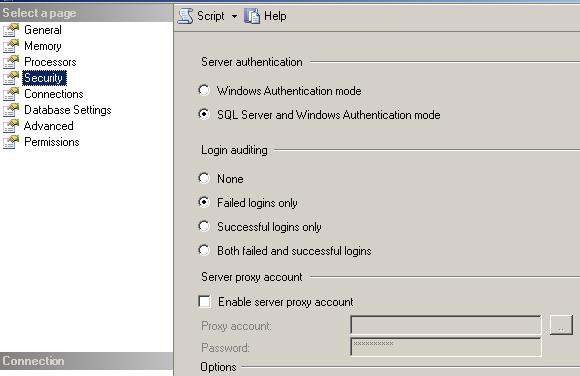
 I am seeing a lot of searches on this blog or reaching this blog from MSN/Google with this search “SQL 2005 Login failed for user 'sa'. Reason: Not associated with a trusted SQL Server connection.” So this is what causes the problem: your SQL Server has been setup with windows authentication only. In order to make it mixed mode authentication right click on the server name in enterprise manager select properties and click on the security tab. Select SQL server and Windows Authentication mode(see picture…) and that will fix it The cool thing about SQL server 2005 is that you can script this out so that you can run the code on multiple servers instead of going to all the servers and clicking etc. Just click on script and code like the one below will be generated
USE [master]
GO
EXEC xp_instance_regwrite N'HKEY_LOCAL_MACHINE', N'Software\Microsoft\MSSQLServer\MSSQLServer', N'LoginMode', REG_DWORD, 2
GO
For the SQL server 2000 version go here


6 comments:
thanks...
I need to restart the SQL Server service for it to work.
Anyway, thanks :)
thanks it worked for me
thanks
Works perfect
http://aspdotnetexpert.blogspot.com/2008/06/login-failed-for-user-sa-reason-not.html
COOOL ... it worked for me too. THANKS.
Post a Comment